

 Menu
Menu
A Microsoft blog entry mentions that Windows 11 Release Preview 26100.8106 and 26200.8107 now supports above 1000 Hz.
Monitors can now report refresh rates higher than 1000 Hz.
What’s little known is that Mark Rejhon of Blur Busters had a hand in convincing Microsoft in dramatically raising refresh rates to 5000 Hz, explaining that retina refresh rates can go as much as 20,000 Hz in previous articles Stroboscopic Effect of Finite Frame Rates, and Vicious Cycle Effect in Blur Busters Law where higher resolutions and faster pixel response (OLED) amplifies refresh rate differences.
Also, I also mentioned that I have confirmed multiple manufacturers are already working on 2000 Hz displays that will arrive by 2030. In February, a contact at Microsoft finally emailed me:
I just put a change in that will raise the limit to 5000 Hz on retail Windows 24H2 and later
.
It should be available in Windows Insider Dev channel soon and will rollout to retail…
You’re welcome. Enjoy.
Are There Human Visible Benefits To Mainstream? Yes.
The diminishing returns go a long way, but there are blind study variables that shows 120 Hz versus 480 Hz OLED more human visible than 60 Hz vs 120 Hz LCD for more than 99% of the mainstream. As long as you use large geometrics, they remain visible to the mainstream.
From many more recent research papers, the four approximate orders of magnitude of human-sensitivity thresholds are the following (threads on X.com and BlueSky):
- 10 – Slide shows turns into motion.
- 100 – Flicker fusion threshold. Flicker ceases to be visible (Talbot Plateau)
- 1000 – (at GtG=0.0) motion blur ceases to be visible for tiny 1080p screens (tablets, etc).
- 10000 – motion blur and stroboscopics cease to be visible for wide-FOV retina-resolution screens.
While diminishing returns become strong, the runway is very long; all the way to 5-digit refresh rates! Two YouTubers discussed the quintuple-digit humand-visible threshold of refresh rates of no further humankind benefit, one by techless, and one by Film Maker IQ
However, Blur Busters dislikes refresh rate incrementalism. We recommend geometric upgrades (upgrade 120 Hz to 480 Hz, etc), since it’s like motion blur of 1/120sec camera shutter and 1/480sec camera shutter.
4x upgrades if you’re a mainstream user, and 2x upgrades if you’re a prosumer user. Only professional esports need to bother to spend extra funds on “refresh rate incrementalism”, since visibility differences are pretty small.
*Best Practices For Mainstream Upgraders: 4x Geometric and GtG=0
Mainstream users (non-esports) should upgrade refresh rates by 4x.
In short you metaphorically need to “480p-vs-8K it” rather than “720p-vs-1080p it”. So it is useful to upgrade past refresh rate incrementalism (e.g. 165-vs-240, or 240-vs-360) while keeping GtG as near zero as possible.
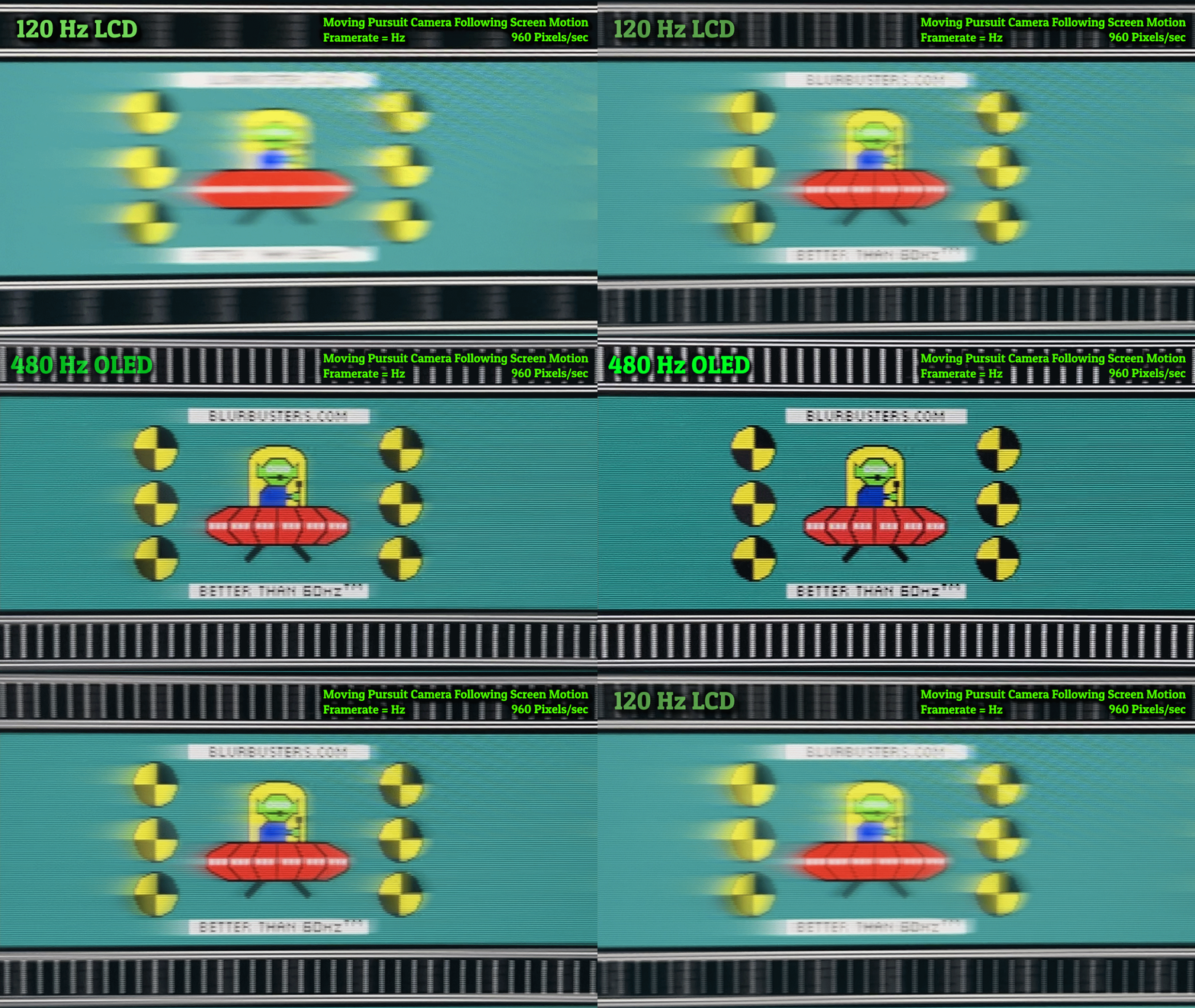
Even 100% refresh rate compliance (nonzero GtG) still has more motion blur than 100% refresh rate compliance (GtG=0). This is evidenced by OLEDs being about 1.5x to 3x clearer at the same refresh rate.
This is because LCD GtG is like a slow-moving camera shutter before/after refresh cycle. You do not want 1ms GtG before & after your 1ms frametimes!
Hz Upgrades Are Sabotaged by Low DPI & Slow GtG
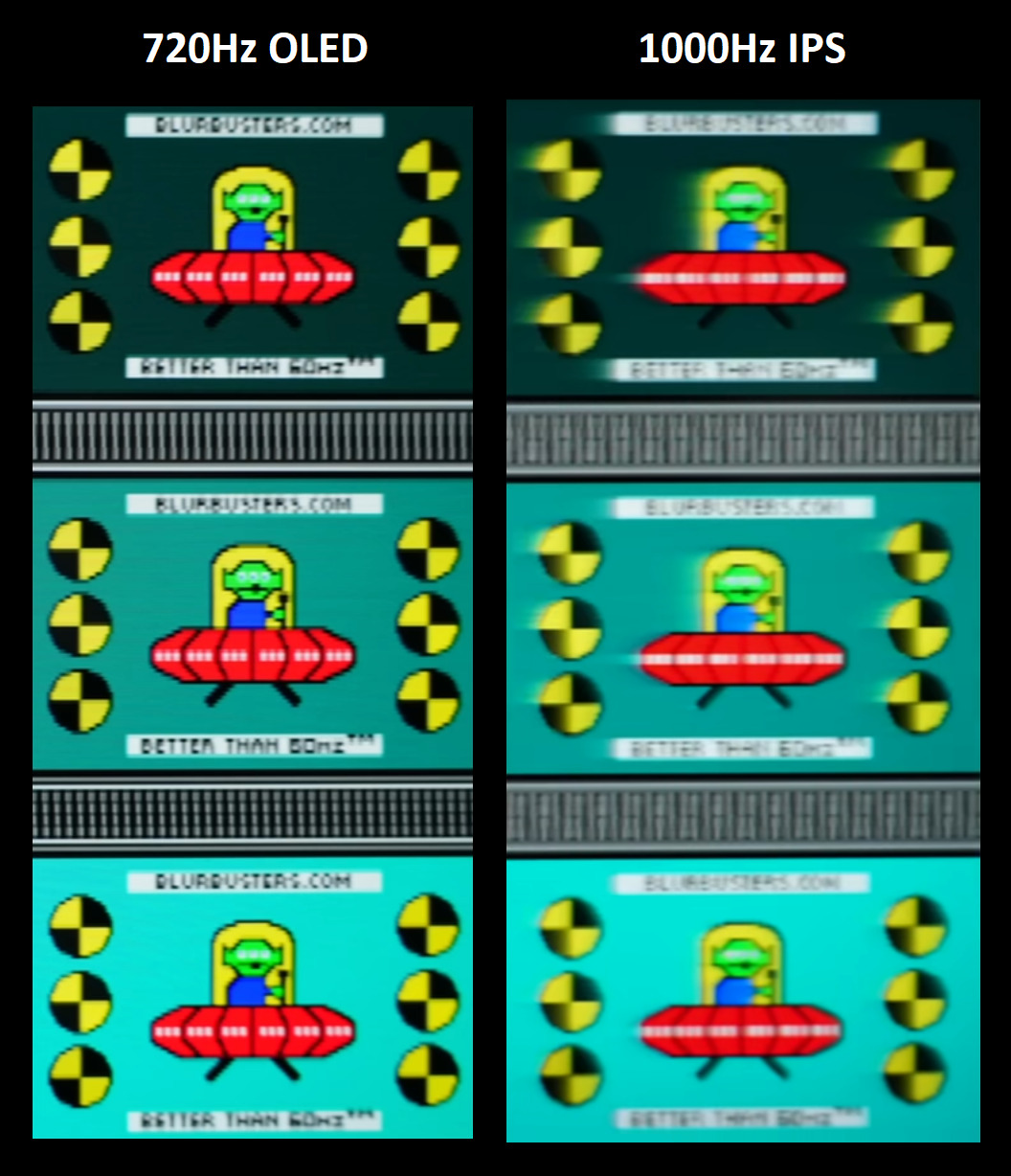
Recently, a Chinese reviewer posted results of a 720 Hz OLED (27GX790B) versus a 1000Hz IPS LCD (27M2N5500XD). This clearly shows that OLED outperforms LCD on a per-Hz basis, if no strobing is used.
Discorz from Blur Busters Forums stitched together their 720 Hz OLED and 1000 Hz LCD results from separate videos on bilibili (a China clone of YouTube):
Low Mouse DPI Also Sabotages High Hz
In addition, the use of low mouse DPI (400dpi-800dpi) can sabotage the benefits of your high refresh rate display, for slow mouselooks.
Moving a mouse at 400dpi at 0.25 inches per second only shows 100 mouselook frames per second, utilizing only one-tenth the refresh rate of a new 1000 Hz monitor! Therefore, this can hurt some competitive advantages in certain games that may utilize frequent slower mouse tracking operations.
Use 1600+ dpi at 480+ Hz Refresh Rate, Even More Important on 1000Hz+ Refresh Rate
Increasing mouse DPI, and adjusting poll rate slightly, can dramatically improve slow mouse movements (RTS map panning, target tracking, corrections, and other non-flick movements etc) when using extremely high refresh rates. Use a mouse-sensitivity.com and TestUFO Mouse Jitter to re-optimize your mouse for your new display refresh rates.
While a lot of professional esports players use low DPI because of better performance in some games like CS2, many esports players on prosettings.net in other games (Valorant, Fortnite) has already transitioned to 1600dpi or even higher.
In Windows Control Panel, make sure to disable “Enhance Pointer Precision” and reduce mouse sensitivity to make your 1600dpi+ mouse pointer feel like your original 400dpi or 800dpi mouse pointer, without interfering with most rawinput games.
To See Differences, Test Motion Speeds in Pixels/Sec At Least 2x Display Hz
To continue to see differences in motion blur, display testers need to test motion speeds in pixels per second at least 2x-4x display Hz, for motion that requires eye-tracking or camera-tracking (pans, scrolls, etc). This makes Blur Busters Law behaviors visible (1ms = 1 pixel of motion blur per 1000 pixels/sec).
Currently, the popular TestUFO Ghosting Motion Test (with pursuit camera feature) now recommends 1920 or 2000 pixels/sec instead of the classic 960 pixels/sec (See Why TestUFO Used 960 Pixels Per Second).
Supersample Your Mouse Poll Rate At Least 2x-4x Display Hz
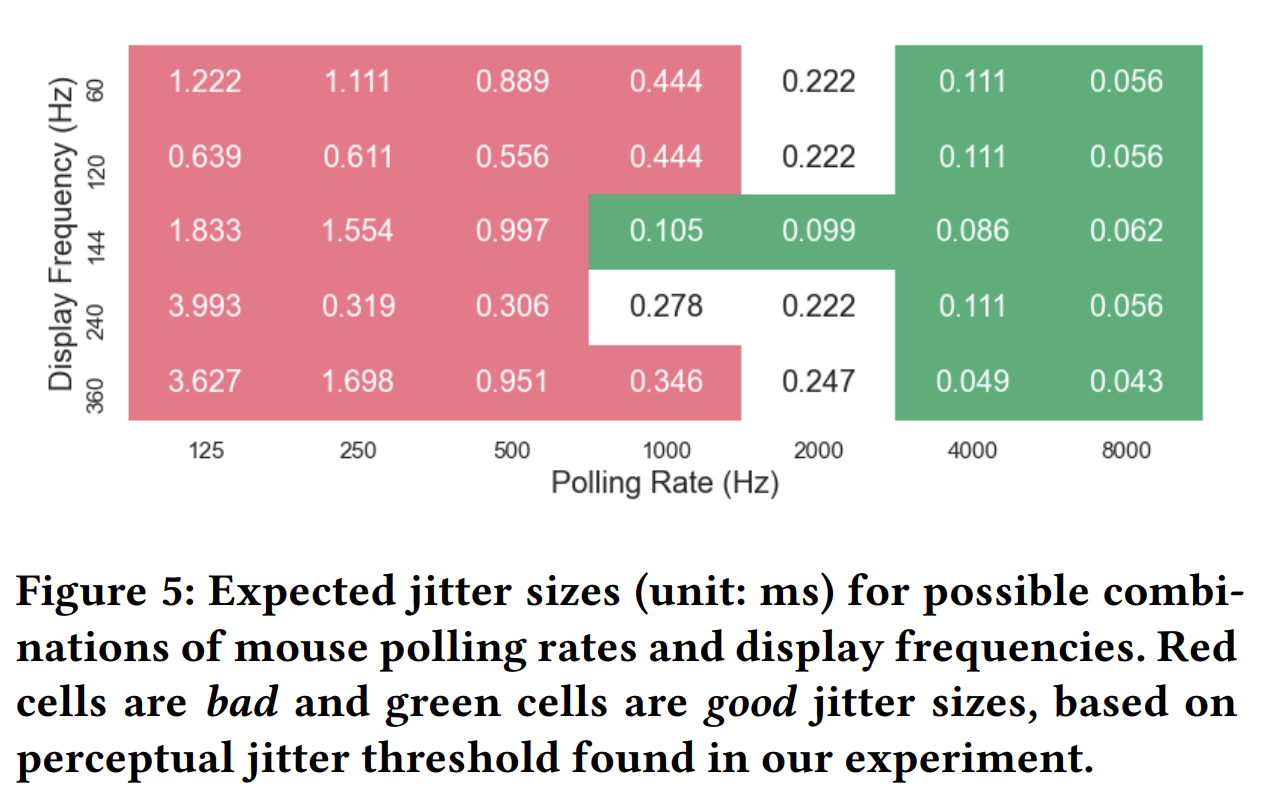
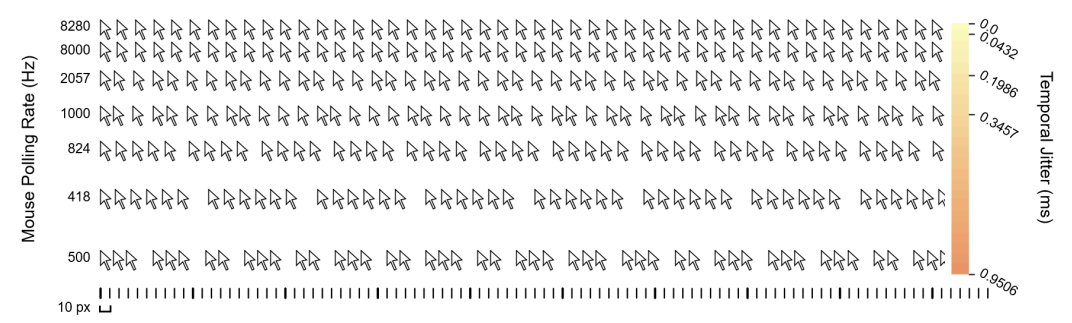
If you’re using a 720Hz OLED, use at least a 2000Hz mouse poll rate to prevent jitter between mouse Hz and display Hz. While 8000 Hz nice, it is risky to use full 8000 Hz mouse poll rate.
If playing Valorant at a 2000Hz mouse poll rate or higher, we recommend enabling the “RawInputBuffer” mode in the game to prevent mouse poll rates from using too much CPU and lowering game frame rates as it can frequently happen on older rigs and/or less optimized game engines.
This RawInputBuffer tweak can make Valorant largely immune to CPU performance problems caused by extreme mouse poll rate.
An earlier research paper shows the benefit of going above 1000 Hz poll rate (DOI 10.1145/3472749.3474783), provided the game CPU loop can keep up. The Goldilocks threshold will be “high as possible” but “do not overload your CPU and reduce your frame ratte”.
https://dl.acm.org/doi/abs/10.1145/3472749.3474783
https://dl.acm.org/doi/abs/10.1145/3472749.3474783