G-SYNC 101: G-SYNC Fullscreen vs. Borderless/Windowed


DWM Woes?

Requested by swarna in the Blur Busters Forums, is a scenario that investigates the effects of the DWM (Desktop Windows Manager, “Aero” in Windows 7) on G-SYNC in borderless and windowed mode.

Unlike exclusive fullscreen, which bypasses the DWM composition entirely, borderless and windowed mode rely on the DWM, which, due to its framebuffer, adds 1 frame of delay. The DWM can’t be disabled in Windows 10, and uses it’s own form of triple buffer V-SYNC (very similar to Fast Sync) that overrides all standard syncing solutions when borderless or windowed mode are in use.

To make sure this was the case, all combinations of NVCP and in-game V-SYNC, as well as the Windows 10 “Game Mode” and “fullscreen optimization” settings were tested to see if DWM could be disabled, and tearing could be introduced; it could not be, so Game Mode and fullscreen optimizations were disabled once again, and NVCP V-SYNC was re-enabled across scenarios for consistency’s sake.

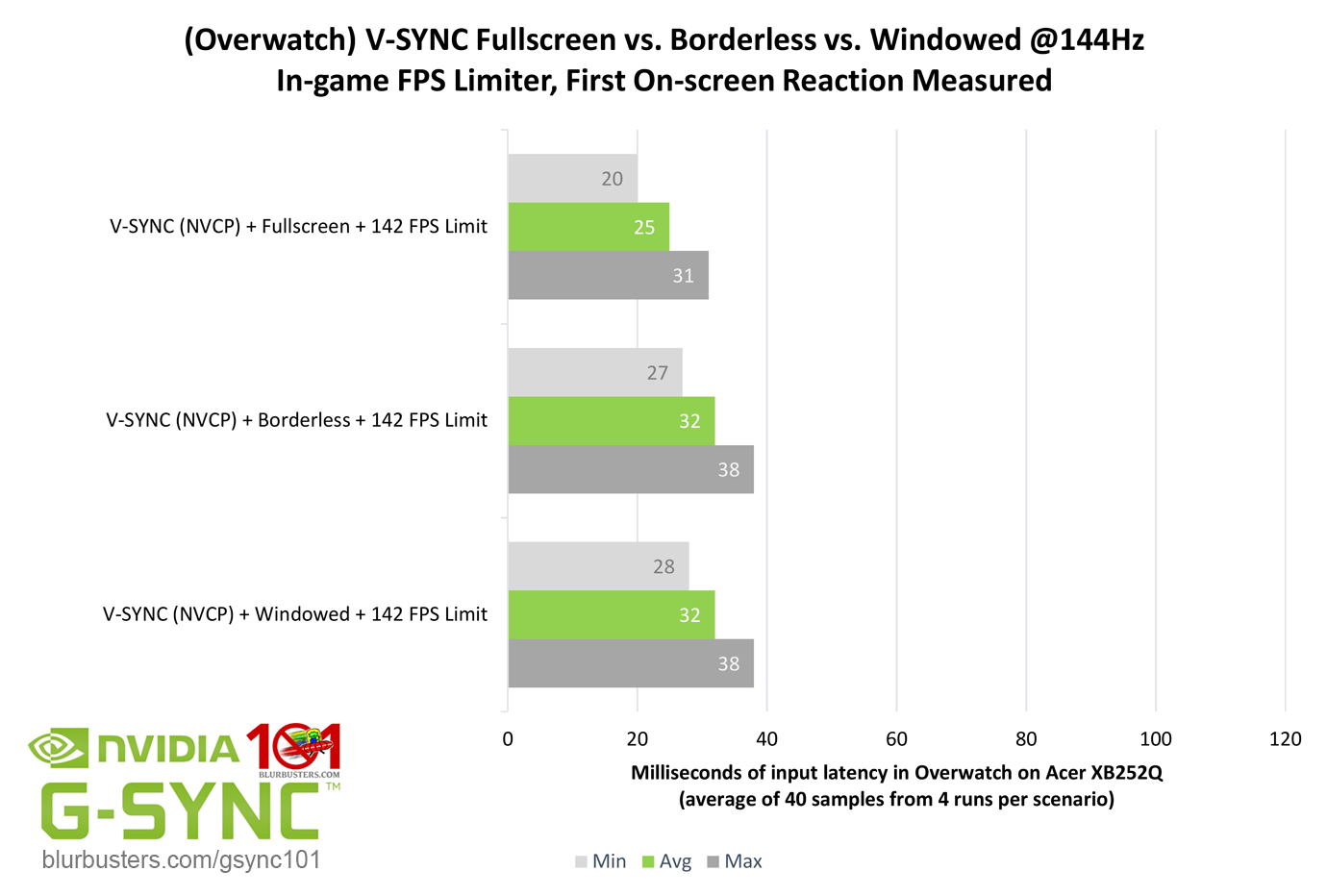
The question is, does DWM add 1 frame of delay with G-SYNC using borderless and windowed mode?
Blur Buster's G-SYNC 101: Input Latency & Optimal Settings

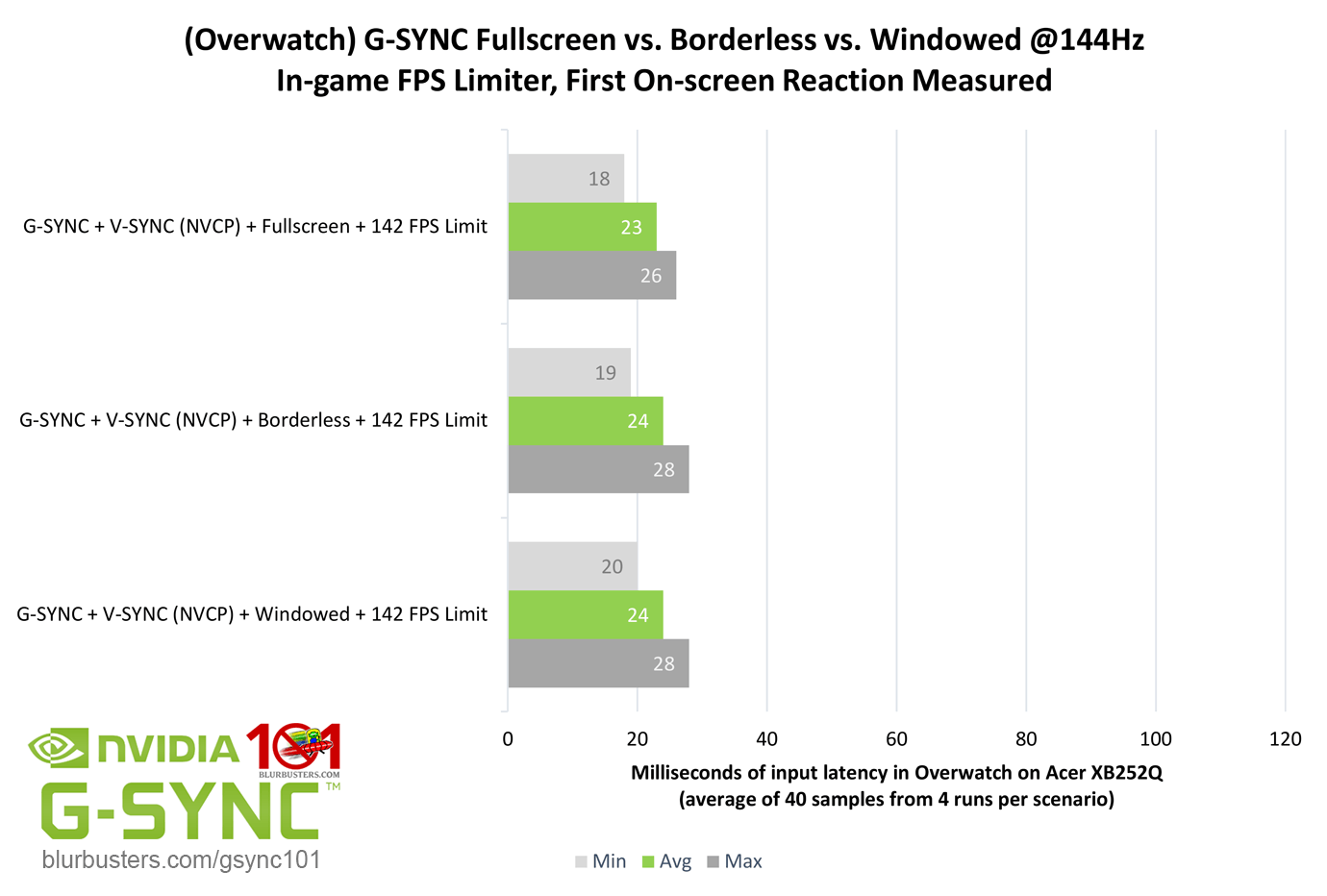
Overwatch, shows that, no, with G-SYNC enabled, both borderless and windowed mode do not add 1 frame of delay over exclusive fullscreen. Standalone “V-SYNC,” however, does show the expected 1 frame of delay.

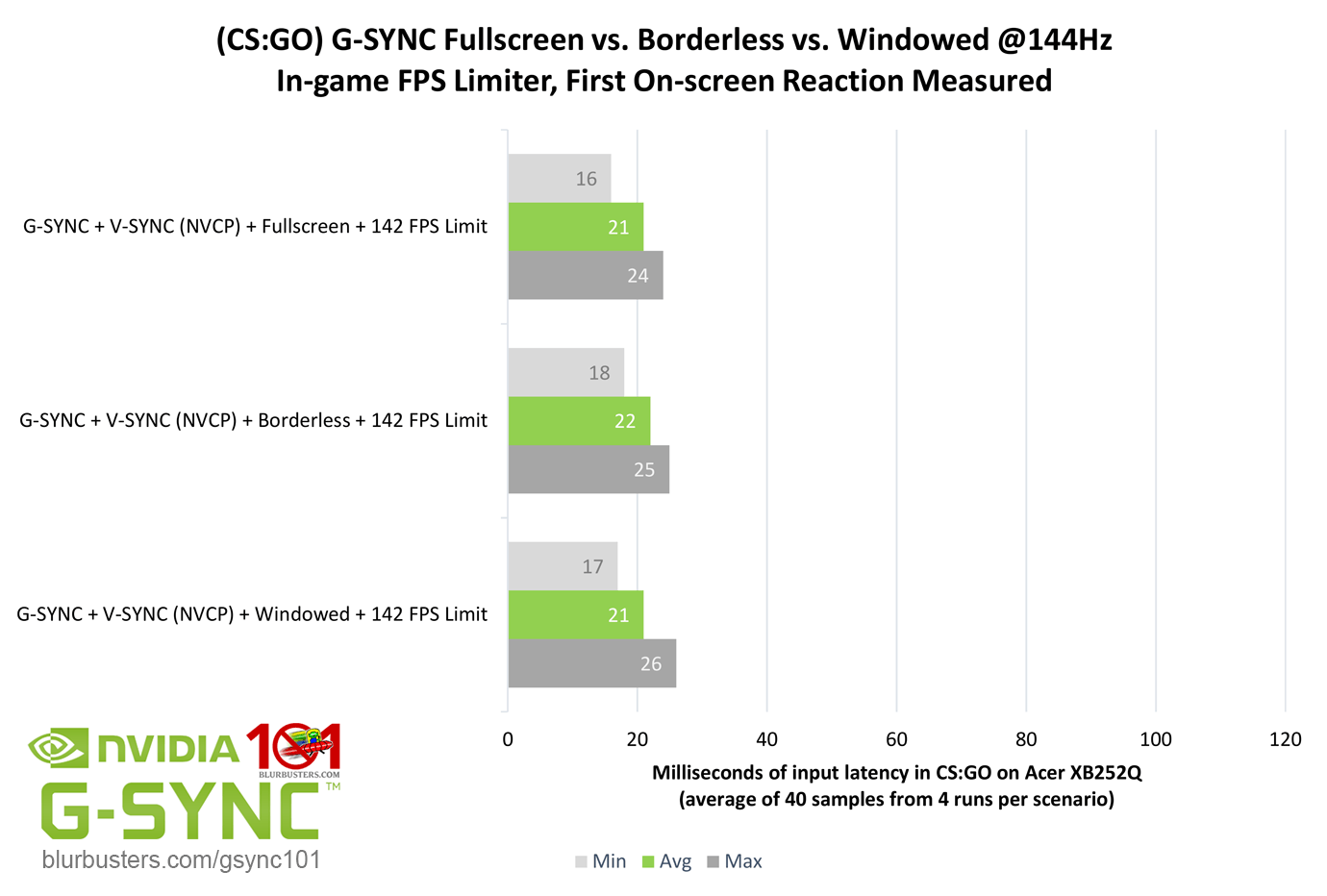
CS:GO was also tested for corroboration, and ought to have the same results, as DWM behavior is at the OS-level and should remain unchanged, regardless of the game…
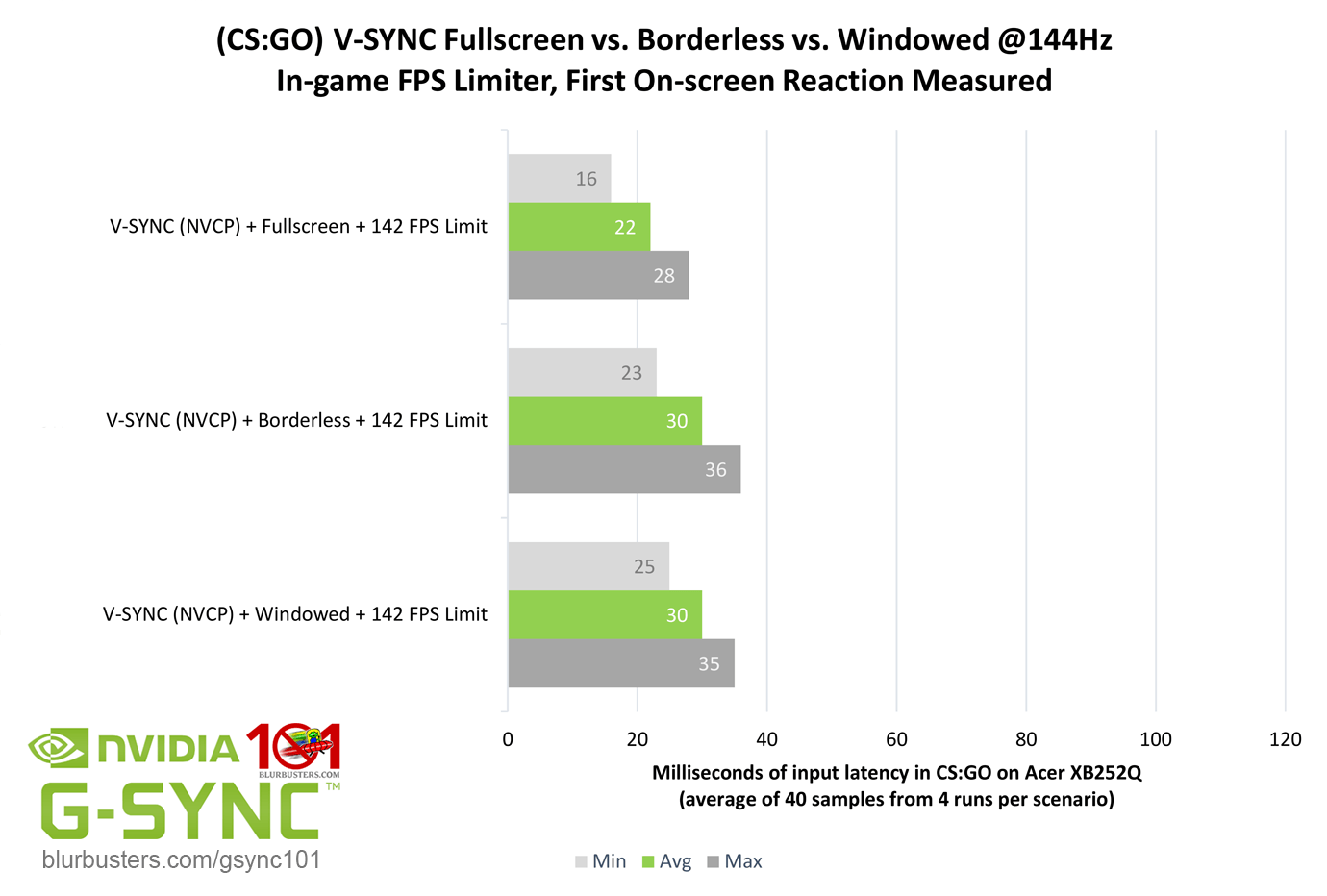
Blur Buster's G-SYNC 101: Input Latency & Optimal Settings

Sure enough, again, G-SYNC sees no added delay, and V-SYNC sees the expected 1 frame of delay.

Further testing may be required, but it appears on the latest public build of Windows 10 with out-of-the-box settings (with or without “Game Mode”), G-SYNC somehow bypasses the 1 frame of delay added by the DWM. That said, I still don’t suggest borderless or windowed mode over exclusive fullscreen due to the 3-5% decrease in performance, but if these findings are true across configurations, it great news for games that only offer a borderless windowed option, or for multitaskers with secondary monitors.



3852 Comments For “G-SYNC 101”

This site uses Akismet to reduce spam. Learn how your comment data is processed.

Sort by:   newest | oldest | most liked
Iriodus
Member
Iriodus

So, 2 separate but related questions:

1) For games that use the Vulkan renderer, like Doom Eternal, should we be using borderless fullscreen or exclusive fullscreen?

2) Not sure if you’d know the answer to this one, but since Proton on Linux uses a DirectX-to-Vulkan translation layer, should people use the recommendation for question 1 above, or say if a game is DirectX11 before taking into account the DX-to-Vulkan translation do use Fullscreen/Exclusive Fullscreen as if we were on Windows.

For reference, I’ve replicated the optimal G-Sync setup on my Linux machine, and since switching I’ve just been doing “If it’s originally DX11 or lower? Fullscreen/Exclusive Fullscreen. If it’s originally DX12? I use borderless fullscreen”

ksydew
Member
ksydew

Sorry for posting so much but I have one last question, I just bought the acer Nitro XV275U F5BIIPPRX, it’s a free sync premium Pro monitor but isn’t g sync certified. It should still work with g sync no problem right? I have it turned on same usual settings, g sync indicator is working and on in the top right corner, but just want to make sure it’s fine? It seems like it is but I’m not the expert

ksydew
Member
ksydew

With the newest drivers nvidia has now gotten rid of the nvidia control panel. Does this change anything for how to implement g sync? Has it changed any behavior to your knowledge? I keep g sync on, v sync on and use a frame rate limiter of RTSS. I also use v sync globally. I just had to use DDU due to sudden instability after installing the newest drivers and that’s when I found out nvcp was missing.

Flop
Member
Flop

What’s the best way to go about using both technologies? My main game is CS2, where i use Fixed Refresh. I want to use G-SYNC in pretty much every other game though. It seems that in order to do this, i have to enable G-SYNC in the global settings, then set CS2 to Fixed Refresh in Program settings. I would rather do this the other way around though (though it doesn’t work) since I play CS2 most of the time, and the long alt-tab times are annoying (unless there is a way to fix them) due to the game not using G-SYNC, while the rest of the operating system operates with G-SYNC.

tearxinnuan
Member
tearxinnuan

I have a new question. I have two monitors, both of which support G-SYNC. However, I only use one screen for full-screen gaming, while the other is used for watching videos and browsing the web in extended screen mode. I’d like to ask if both monitors need to have G-SYNC enabled simultaneously? Their refresh rates are also different. I only want the primary gaming screen to perform at its best, so will the setup for both monitors be relevant? Looking forward to your answer.

wpDiscuz