
G-SYNC 101: Hidden Benefits of High Refresh Rate G-SYNC


Bonus Points

Often overlooked is G-SYNC’s ability to adjust the refresh rate to lower fixed framerates. This can be particularly useful for games hard-locked to 60 FPS, and has potential in emulators to replicate unique signals such as the 60.1Hz of NES games, which would otherwise be impossible to reproduce. And due to the scanout speed increase at 100Hz+ refresh rates, an input lag reduction can be had as well…
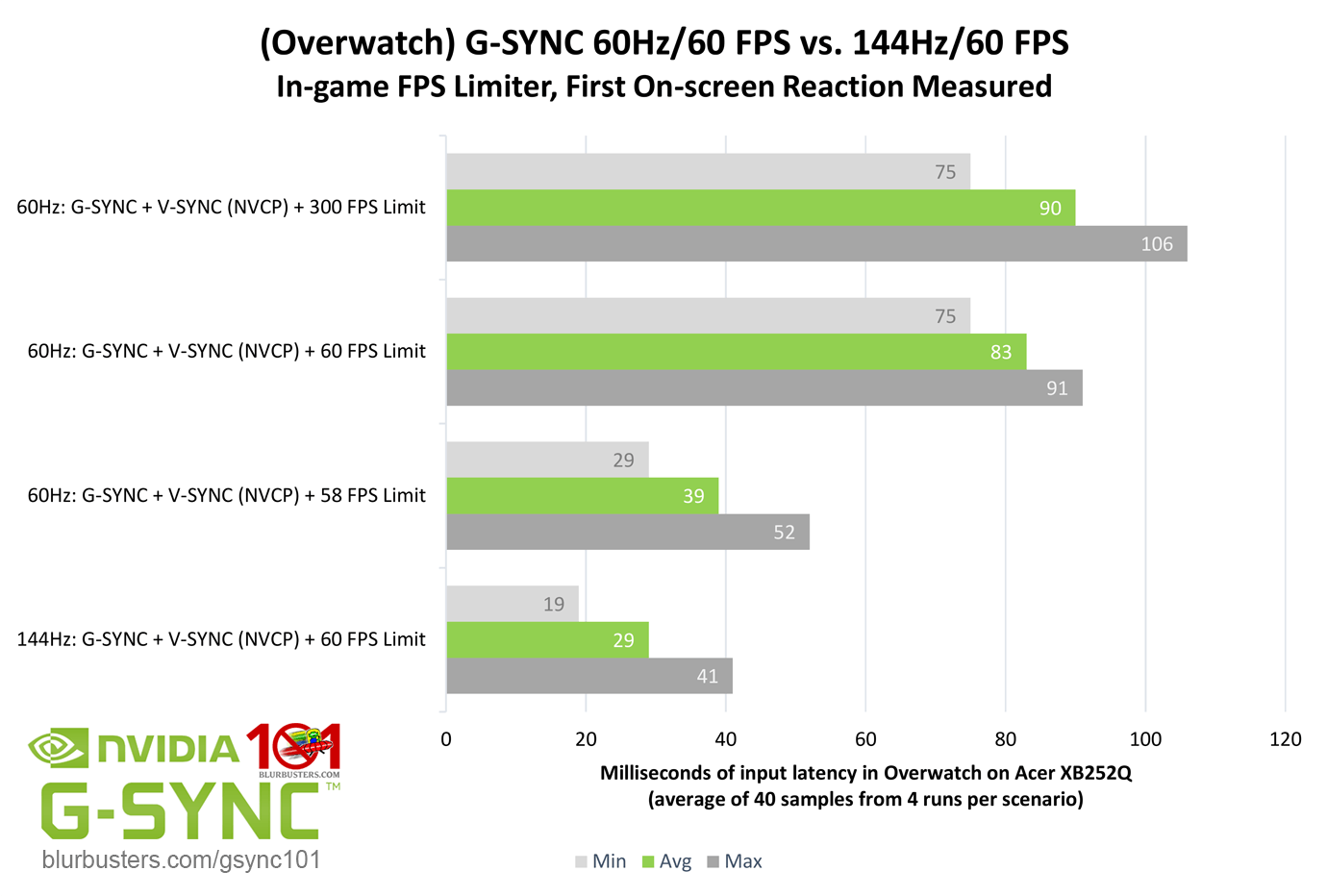
Blur Buster's G-SYNC 101: Input Lag & Optimal Settings

The results show a considerable input lag reduction on a 144Hz G-SYNC display @60 FPS vs. a 60Hz G-SYNC display @58 FPS with first on-screen reactions measured (middle screen would show about half this reduction). And while each frame is still rendered in 16.6ms, and delivered in intervals of 60 per second on the higher refresh rate display, they are scanned in at a much faster 6.9ms per.



3840 Comments For “G-SYNC 101”

This site uses Akismet to reduce spam. Learn how your comment data is processed.

Sort by:   newest | oldest | most liked
ksydew
Member
ksydew

With the newest drivers nvidia has now gotten rid of the nvidia control panel. Does this change anything for how to implement g sync? Has it changed any behavior to your knowledge? I keep g sync on, v sync on and use a frame rate limiter of RTSS. I also use v sync globally. I just had to use DDU due to sudden instability after installing the newest drivers and that’s when I found out nvcp was missing.

Flop
Member
Flop

What’s the best way to go about using both technologies? My main game is CS2, where i use Fixed Refresh. I want to use G-SYNC in pretty much every other game though. It seems that in order to do this, i have to enable G-SYNC in the global settings, then set CS2 to Fixed Refresh in Program settings. I would rather do this the other way around though (though it doesn’t work) since I play CS2 most of the time, and the long alt-tab times are annoying (unless there is a way to fix them) due to the game not using G-SYNC, while the rest of the operating system operates with G-SYNC.

tearxinnuan
Member
tearxinnuan

I have a new question. I have two monitors, both of which support G-SYNC. However, I only use one screen for full-screen gaming, while the other is used for watching videos and browsing the web in extended screen mode. I’d like to ask if both monitors need to have G-SYNC enabled simultaneously? Their refresh rates are also different. I only want the primary gaming screen to perform at its best, so will the setup for both monitors be relevant? Looking forward to your answer.

jPqQhMkV1b2fwm27ri07e0cZs64e42aLXE4w0cUiOlUl7kIwid
Member
jPqQhMkV1b2fwm27ri07e0cZs64e42aLXE4w0cUiOlUl7kIwid

Can I run Maxwell-era (GTX 970) GPUs in SLI mode with native GSYNC? I have read conflicting/contradicting reports. Some of them mention performance drop in SLI + GSYNC mode. I have even found an opinion that GSYNC does not work properly with SLI due to the fact that GSYNC wasn’t designed with SLI in mind. Do you have any knowledge in this regard?

2ndHouse
Member
2ndHouse

Just making sure I got this right…

Setting “Preferred refresh rate” to “Highest available” globally is not needed as it will automatically kick in while G-SYNC is on?

I recently performed a driver reset and can’t remember if I had that setting on globally or not before, and not 100% sure what to set it to. I don’t see it mentioned on the Optimal G-SYNC settings page, so I’m thinking it might be best to just leave it at driver default?

wpDiscuz